Change Your Language Setting
The Early Ed Connect website is available in both English or Spanish. To change the language on your screen, follow the directions below.
Change The Language on Your Mobile Device
To switch the website from English to Spanish, follow the steps below.
1. Click the white box on the top right of the screen.
Cambia el idioma en tu dispositivo móvil
Para cambiar el sitio web de inglés a español, sigue los pasos a continuación.
-
Haz clic en el cuadro blanco en la parte superior derecha de la pantalla.

2. Click the green Español button on the top left side of the screen. This changes the setting to Spanish across the site. Click the button again to switch back to English.
2. Haz clic en el botón verde que dice “Español” en la parte superior izquierda de la pantalla. Esto cambia la configuración del sitio a español. Haz clic en el botón nuevamente para volver al inglés.

To switch the website from Spanish to English, follow the steps below.
1. Click the white box on the top right of the screen.
Para cambiar el sitio web de español a inglés, sigue los pasos a continuación.
-
Haz clic en el cuadro blanco en la parte superior derecha de la pantalla.

2. Click the green English button on the top left of the screen. This will change the setting to English across the site. Click the button again to switch back to Spanish.
2. Haz clic en el botón verde que dice “English” en la parte superior izquierda de la pantalla. Esto cambiará la configuración del sitio a inglés. Haz clic en el botón nuevamente para volver al español.
Change The Language on Your Computer
Cambia el idioma en tu computadora
To switch the website from English to Spanish:
Para cambiar el sitio web de inglés a español:
1. Click the green Español button at the top middle of the screen.
1. Haz clic en el botón verde que dice “Español” en la parte superior central de la pantalla.
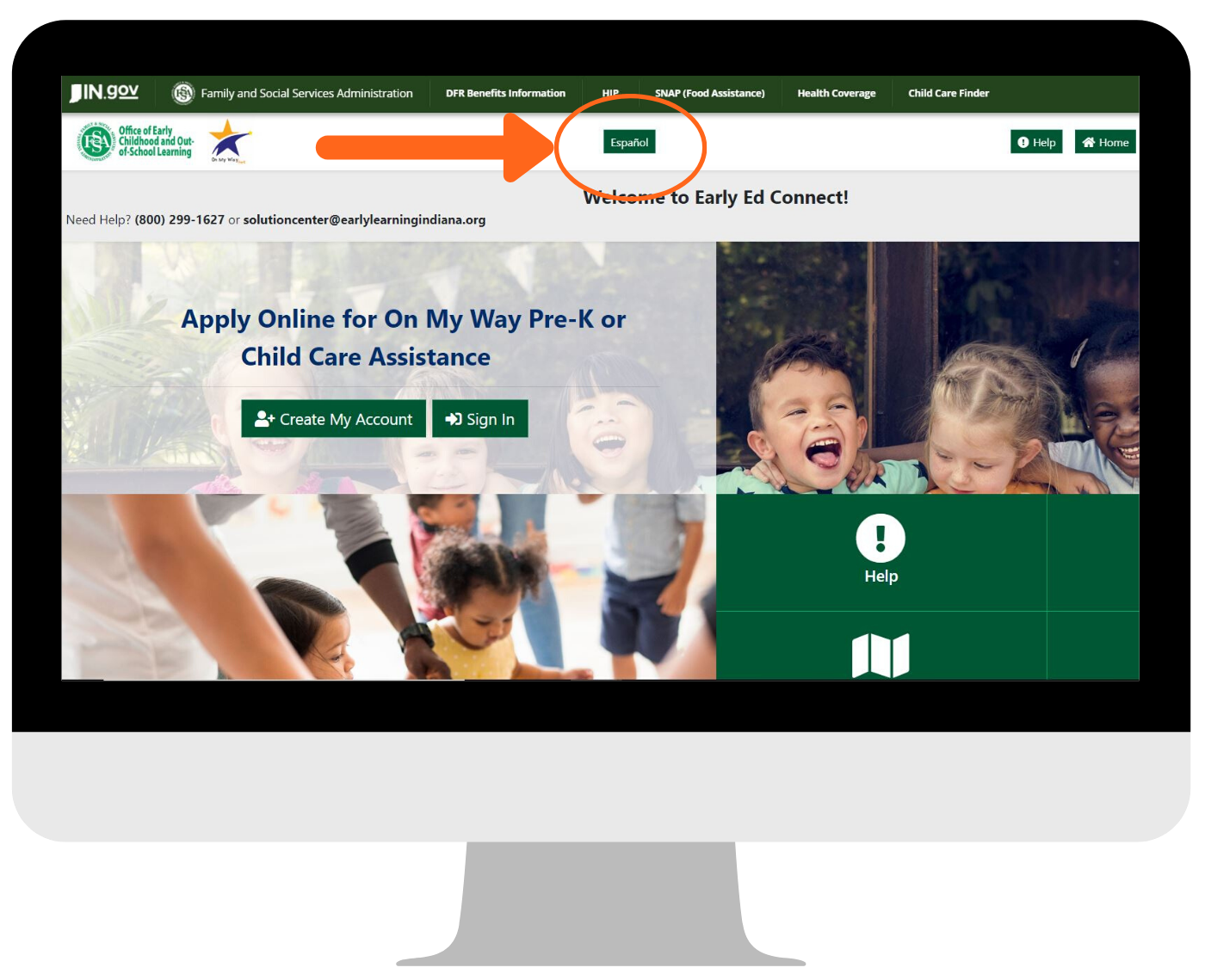
2. This will change the setting to Spanish across the site. Click the button again to switch back to English.
2. Esto cambiará la configuración del sitio a español. Haz clic en el botón nuevamente para volver al inglés.

If you forgot your email address or need other help with your account, contact Indiana 211 at 1-800-299-1627.