
My Vouchers
The My Vouchers section of the Parent Provider Portal (PPP) shows the history and status of all vouchers. After a parent or provider submits a Provider Form to their eligibility office (EO), children approved for vouchers will show in this section. If a child has multiple vouchers, they may be listed several times to show their past, current and future vouchers.

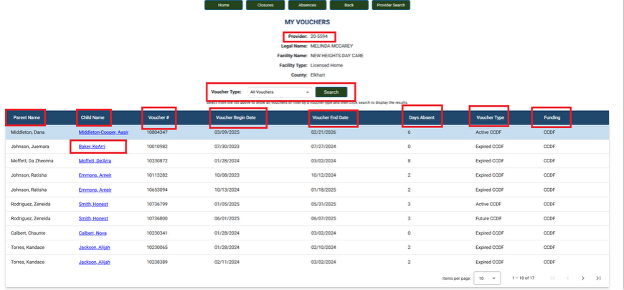
Provider: The license number the child’s voucher is connected to. A drop-down is available to select another child care program location if needed.(only if the Admin is connected to more than one program).
Voucher Type: View all past, current and future vouchers. To view all listings and types, select All Vouchers and click Search. There is an “Items by Page” option that lets the user modify the number of vouchers that can be seen at one time.
Parent Name: The name of the parent/guardian who applied for the voucher.
Child Name: Voucher #: The name of the child who has the voucher. The user can click on the child’s name to view additional information such as:
- Case #: The case number associated with that child’s voucher.
- Anniversary Date: The date when the child’s absences reset. This may not be the same as their voucher end date, and can be different for all children, even children in the same family.
Note: The parent/guardian is responsible for submitting their reauthorization paperwork with their supporting documents to their EO within the 30 days prior to their subsidy end date.
- Total Absences: The total number of Absences a child has accumulated in an enrollment year, across all providers they have had vouchers with. Absences will reset every year at the Anniversary date. Note: The absences will not reset until the provider has submitted attendance for the service period containing the Anniversary date. (If the absences did not reset at the Anniversary date and attendance for that period has already been submitted, providers will need to contact their policy consultant or email paymentquestions@fssa.in.gov for guidance.)
- Medically Fragile: A child with a checkmark in this section means the parent submitted a valid physician’s note to the EO showing the child suffers from a chronic medical condition or long-term hospitalization, which will cause them to miss more than 40 days in an enrollment year. Only children who meet the State’s requirements will be marked with this status. If the child has a checkmark in this section, valid absences will not count against their allotted absences and the total will stay the same. Anyone without a checkmark must stay under their designated yearly allotted absences to maintain access to the voucher.
Voucher Begin Date: The day the voucher will be active at the child care facility. If the date is incorrect, provider admins need to follow up with the parent to determine which start date they gave their EO. If issues continue with the voucher start or end date even after involving the parent, provider admins should contact their CCDF policy consultant for assistance.
Voucher End Date: The day the voucher will end for the current child care facility. If breaks happen throughout the year, or the child has an age group change, there could be multiple vouchers for the same child and providers should look at the last end date. Send Provider Forms and school calendars to the EO to establish accurate start and end dates for multiple periods if necessary.
Days Absent: The number of absences the child has accrued in an enrollment year, across all providers. Each child has a maximum of 40 voucher absences per enrollment year. These absences reset at the child’s Anniversary date.
Voucher Type: Indicates whether the voucher is active, expired or scheduled for a future date.
Funding: Indicates the funding source of the voucher: CCDF or OMWPK.
Need Additional Help?
Should you need any guidance or support, contact the OECOSL Child Care Support Line at 1.800.299.1627 or Qualitysupport@fssa.in.gov for assistance.
Disclaimer: It is the provider's responsibility to check their vouchers in the provider portal every week and report any discrepancies to avoid improper payments. If a provider is paid for a child who is not enrolled/attending, these payments should be reported to the state as soon as possible, and a recoupment will be processed if the provider still has current vouchers. If the provider does not have any current vouchers, the provider will be responsible for mailing a check to the state and will receive instructions from their policy consultant.