Brighter Futures Logo

Closure Dates

The Closure Dates section of the Parent Provider Portal (PPP) portal is where provider administrators put in the days their child care facility is closed. Provider administrators may need to close their child care facility for a number of reasons (ex: professional development, vacation, medical or life emergency, weather-related issues, etc.).


Paid vs. Non-Paid Closures

Providers have 16 paid closure days per calendar year that they can use at their discretion when the program is closed for the day and they still expect payment. If they are closed the entire week and expect full payment, they will need to use five (5) paid closure days.

When non-paid closures are selected, the provider's payment for that week will be reduced by one-fifth (1/5) of their weekly subsidy reimbursement amount per day marked as non-paid.

The intent of non-paid closures is for occasional planned or unplanned closures when paired with a regular payment. They should not be used for periods when a provider is closed and should not have had vouchers assigned.

Providers who are closed for summer or extended periods should not use non-paid closures. The vouchers should be adjusted to reflect the correct dates of enrollment. Providers should report these changes on the Roster Clean Up form. Providers should not enter non-paid closures just to submit periods that have vouchers assigned in error.

Note: The number of closure dates can be found under Saved Closures. Paid closures start over at the start of each calendar year. To receive payment when the facility is closed, providers must use their Paid Closures (PC) before using Non-Paid Closures (NP).
I Lead 83
I Lead 84

Terms

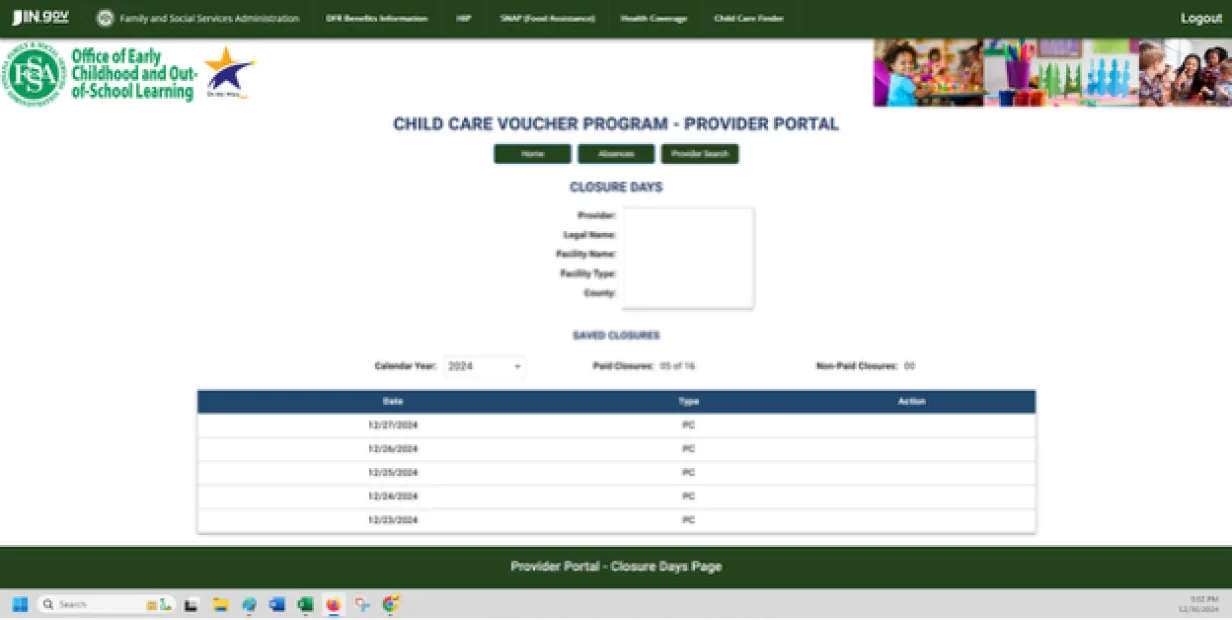
Provider

The license for which providers are submitting closure dates.

Legal Name

The name of the primary entity/person responsible for the child care program.

Facility Name

The name of the selected child care facility. (There is a copy of the license number listed in the Provider section of the I-LEAD dashboard.)

County

The county in which the program is located.

Date

Selected when the provider wants to close their facility.

Type

Used to signify type of closure: Paid Closure or Non-Paid Closure.

Add

Ability to include the closure to the Saved Closures section below.

Saved Closures

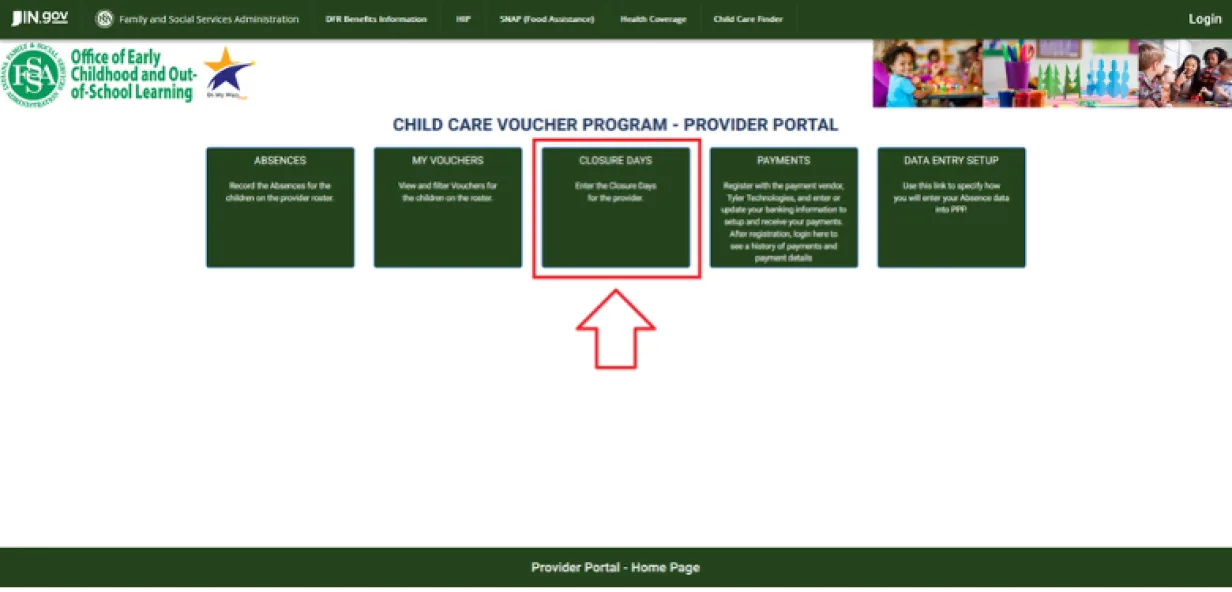
A calendar to select which days the child care facility will be closed using a drop-down menu.

  • Calendar Year: This section shows which calendar year the facility will be submitting closures.
  • Paid Closures: This shows how many paid closures are used for the calendar year. At the start of each calendar year, the paid closures will reset to 00 of 16. As closures are added, they will be reflected in this section (Ex: 4 closures, 04 of 16 closures used).
  • Non-Paid Closures: This shows any non-paid closures selected. Non-paid closures should only be used when all 16 paid closures have been used for the year.

Note: Make sure when submitting the closures, OK is pressed, so the closure gets added.

Delete

Allows the provider to remove the closure date if it was added by mistake (before the attendance period is submitted).


Verifying Closure Dates Selections:

To view full instructions on how to select a closure date, see this guide (pages 2 & 3). When adding a closure date, select the date by either typing it in or using the calendar icon and then hitting the ADD button. The date will populate at the bottom of the page. Dates must be selected one at a time.

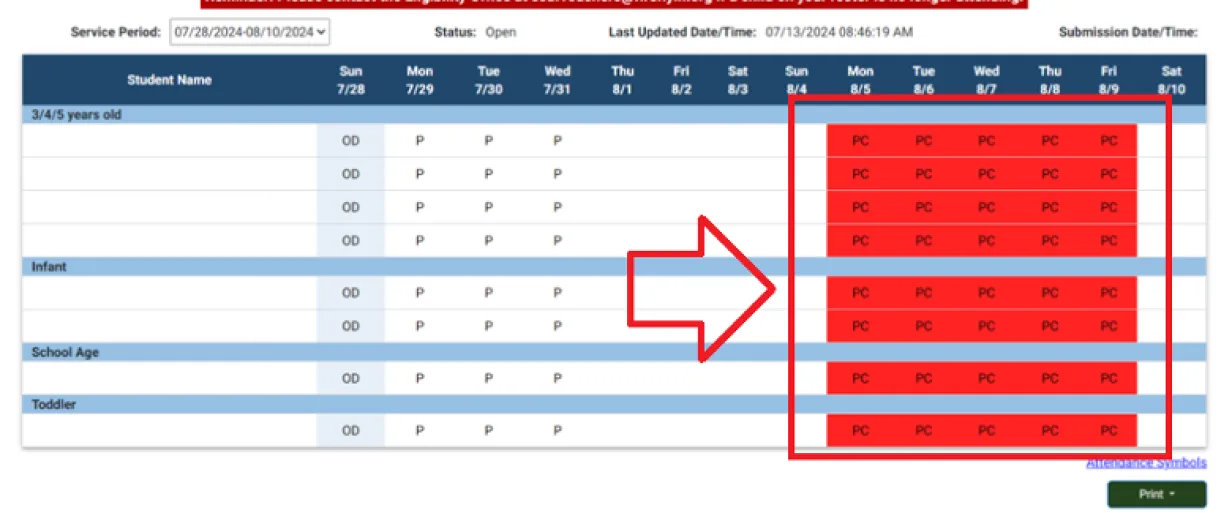
If the closure dates are saved correctly, the corresponding dates on the Absences section will fill up the column with a red mark and put “PC” or “NP” for the dates selected and no attendance can be submitted for those days. Non-paid closures may also be selected by the provider at their discretion. It is recommended that paid closures be used first.

When non-paid closures are selected, the provider's payment for that week will be reduced by one-fifth of their weekly subsidy reimbursement amount per day marked as non-paid.

I Lead 85

Correcting Incorrect Closure Dates After Submission:

Once a service period is submitted, the codes can no longer be edited in I-LEAD. Instead, providers will need to reach out to their Policy Consultant or contact paymentquestions@fssa.in.gov to have these corrected. Corrections can only be made for sixty (60) days in the past.

Need Additional Help?
Should you need any guidance or support, contact the OECOSL Child Care Support Line at 1.800.299.1627 or Qualitysupport@fssa.in.gov.

Disclaimer: It is the provider's responsibility to check their vouchers in the provider portal every week and report any discrepancies to avoid improper payments. If a provider is paid for a child who is not enrolled/attending, these payments should be reported to the state as soon as possible, and a recoupment will be processed if the provider still has current vouchers. If the provider does not have any current vouchers, they will be responsible for mailing a check to the state and will receive instructions from their policy consultant.

View Payment Guide

Related Articles

View All