
Managing CCDF & OMWPK Vouchers as a Provider Admin
Provider admins who wish to participate in the voucher program will need to manage their vouchers on I-LEAD through the Attendance and Voucher Info button. This section is used to submit attendance every other week, view children’s vouchers, manage voucher payments and (if applicable) link their Child Care Management System (CCMS). Provider admins are required to submit attendance biweekly to receive voucher payments through their direct deposit.
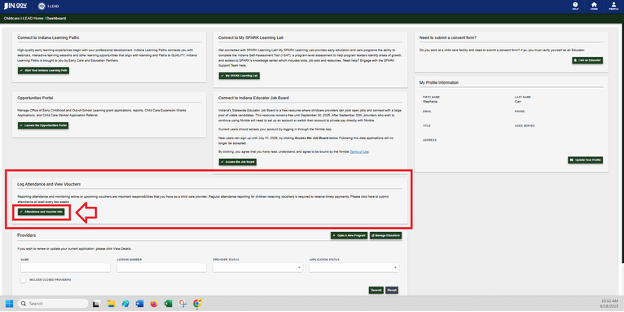
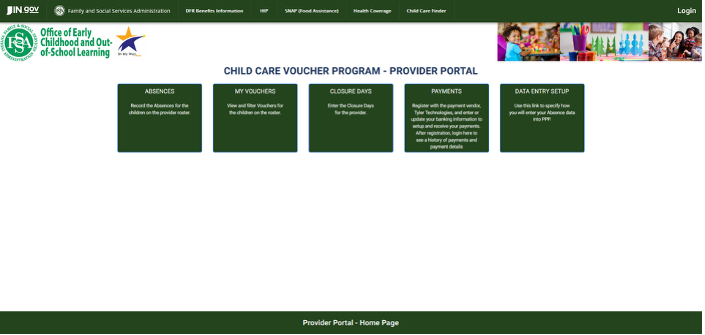
The Attendance and Voucher Info button is located on the I-LEAD Dashboard. Only provider admins who accept an admin invite, for each license they are invited to, will have access to this feature.
For more information related to how to navigate this section, please select from the options below:
Enrollment Information:
All Child Care and Development Fund (CCDF) and On My Way Pre-K providers are required to sign and return the Provider Notice of Requirements to their CCDF policy consultant to participate in the program for an eligible license.
To add a child with a voucher to the attendance roster, providers must fill out a provider information form. This form should be submitted for each child attending the child care program. These forms can be submitted to the eligibility office by the parent and/or the provider admin. Provider changes need to be submitted before noon on Thursdays for changes to be made effective the following week. These forms will not be processed if they are not completely filled out. To avoid delays in processing, make sure to include the start date. Provider forms without a start date will need to be verified before processing.
If you operate a school-age or On My Way Pre-K program and there are seasonal breaks that you are not operating and not claiming as paid closures, indicate this on the Provider Information form so that vouchers are not set for those dates. A school calendar must also be included; failure to do so will result in improper payments that will need to be recouped by the state.
1099 Tax Forms
Pre-July 2024: Anyone seeking a copy of their 1099 form prior to July 2024 will need to reach out to Conduent directly to receive a copy. Please contact them at 1.866.528.1127 or 1099Support@conduent.com.
Post-Aug 2024: Those who need a copy of their most recent 1099 should either contact Tyler Technologies at 1.844.959.7997 or paymentquestions@fssa.in.gov for assistance.
Additional Pay By Enrollment Resources:
Provider Portal Logging Absences
Changing your data entry method to CCMS in the Provider Portal
Voucher Payment Schedules:
Click here for the 2025 Service Period and Payment Schedule
Click here for the 2026 Service Period and Payment Schedule
Should you need any guidance or support, contact the OECOSL Childcare Support Line at 1.800.299.1627 or Qualitysupport@fssa.in.gov for assistance.
Disclaimer: It is the provider's responsibility to check their vouchers in the provider portal every week and report any discrepancies to avoid improper payments. If a provider is paid for a child who is not enrolled/attending, these payments should be reported to the state as soon as possible, and a recoupment will be processed if the provider still has current vouchers. If the provider does not have any current vouchers, they will be responsible for mailing a check to the state and will receive instructions from their policy consultant.
Stay informed on changes related to Indiana child care by subscribing to the Monday Must Know Bulletin: