
The Provider Details Page
When a licensing application is submitted in I-LEAD, a Provider Details page is generated for each license. The Provider Details page shows all licensing application types, admin invitations and educator invitations. This section is also where consultants post notes and where providers can view pending invitation information for new employees and monitor staff members currently employed at the program.
To access the Provider Details page for each license:
- Log in to I-LEAD.
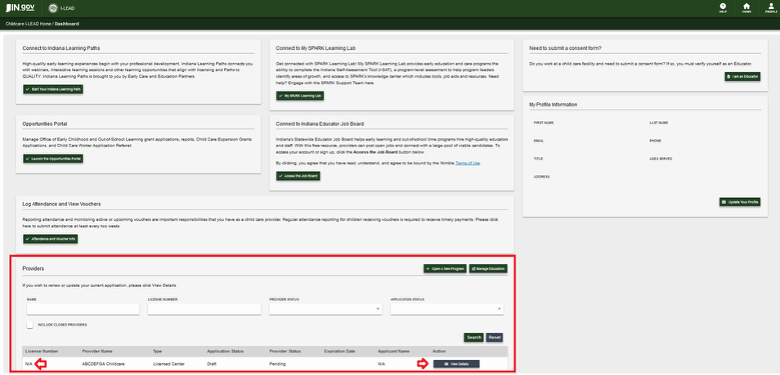
- Scroll to the Providers section of your I-LEAD Dashboard.
- Each license will be listed with a license number in this section. Click on the View Details button to view information exclusive to that license.
Note: Those who have an “N/A” under License Number need to finish their draft application(s). I-LEAD will automatically assign a license number immediately after the application has been signed and submitted. Click on the Edit Application button to finish the new licensing application.
Provider Details Sections
For more information about the different sections on the Provider Details page, please click the following links below:
Need Additional Help?
If you have questions or need technical support, contact the OECOSL Child Care Support Line at 1.800.299.1627 or email Qualitysupport@fssa.in.gov for additional assistance.