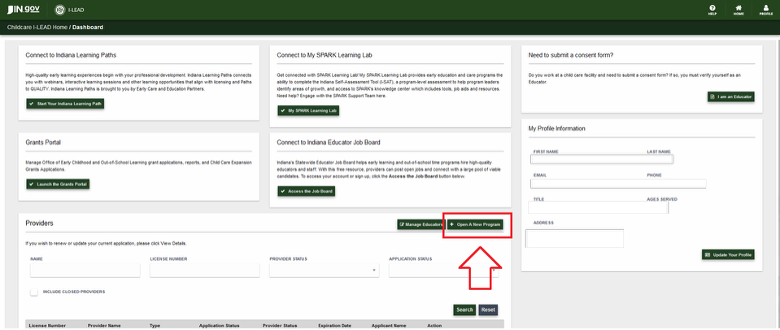
Open a New Program Button


Getting Started
If you are interested in opening a child care program, start here for instructions regarding each child care program type. You must complete all training and requirements before starting your new program application. Once the application is submitted and all staff consent forms and fingerprints are submitted in I-LEAD, the licensing consultant will reach out via phone or email to schedule an inspection of the premises listed on the application.
Application Layout
There are five pages to complete for your new child care program:
- Provider Registration
- Information (Consists of three parts: Application Details, Applicant Details and Provider Details)
- Documentation
- Educators
- Submit
Completing the application after finishing Orientation 1 Training and Orientation 2 Training:
1. Log in to I-LEAD.
2. Click Open a New Program in the Provider section of the I-LEAD Dashboard.
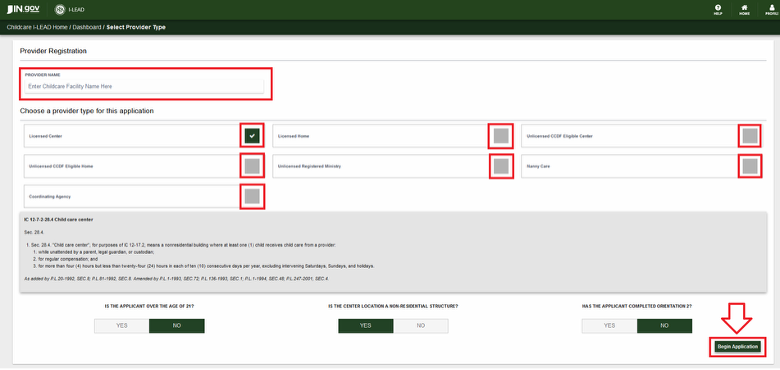
3. Provider Registration: This section allows you to select which child care program you wish to create. Click each option to read the guidelines of each child care program type. Please complete the correct Orientation 2 Training before starting the application. Once you select the correct application, fill out the eligibility questions at the bottom of the page, and click Begin Application to officially start the licensing process. There are seven different child care applications:
- Licensed Center
- Licensed Home
- Unlicensed CCDF Eligible Center Program Center
- Unlicensed CCDF Eligible Home
- Unlicensed Registered Ministry
- Nanny Care
Coordinating Agency (Note: This option is just for Monroe County providers who are already in contact with the pilot program.)
Note: Once you select Begin Application, the application type cannot be changed. If you require a different application type, click Home in the upper right-hand corner to return to the I-LEAD Dashboard, then click Open a New Program to select the correct application.
The previous application draft you started and saved will be located in the Providers section of your I-LEAD Dashboard. It will close out on its own 180 days after the last time you clicked Edit Application. If you click the Edit Application button, the countdown will reset. Please disregard any draft expiration notices when this happens.
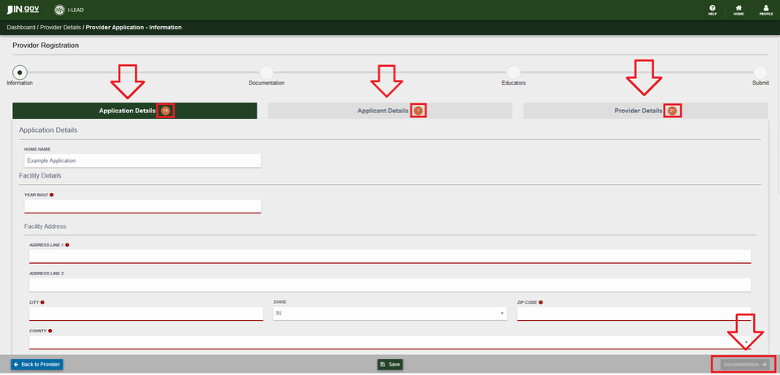
Information: This is the first page of the application. It is split into three categories: Application Details, Applicant Details and Provider Details.
Application Details is the first box highlighted in green at the top of the page when the application is opened. After completing this section, click on the other boxes at the top of the page to access the other categories.
| Application Details | Applicant Details | Provider Details |
Application Details: This section primarily focuses on information about the facility and services offered at the program. Changes that can be made to this page include:
- Name of the child care facility on the first line of the application.
- The year the building was built Note: Zillow offers the history of the property.
- Address where the child care facility operates.
- Mailing address (If a P.O. Box number or different address than the program.)
- Whether the program will take OMWPK or CCDF vouchers.
- The water source of a child care facility. Select Public for city water or Private for well water; well water needs a well test from the health department.
- Class 1 (Max capacity 12 children enrolled) or Class 2 (Max capacity 15 children enrolled) for child care homes.
- Date that Orientation 2 was completed through Indiana Learning Paths by the applicant completing the form (Date Format: MM/DD/YYYY).
- Other questions related to exemptions or church affiliation.
- Auspice.
Applicant Details: This category varies depending on the type of child care program. Individuals are required to enter the following information in this section depending on license type:
- Licensed & LLEP Centers: The director and their contact information, contact information for the board of directors and the person or people running the child care program.
- Licensed & LLEP Homes: The household members living on the property where a home child care program operates. Anyone who is 18 years or older and/or helps with the children needs to be added as an educator and complete a consent form.
- Ministries: The director and board members who assist with decisions for the child care program as well as the pastor/religious leader/president. The same title used for the religious leader should also be used on the final signature page.
- Nanny Care: The parent, the children in the home and the nanny who will work at the parent’s home. Both the parent and the nanny need to be listed as educators and complete consent forms. The parent is the applicant. If the parent who has the voucher changes and still wishes to hire the same nanny, the new parent needs to log in from an admin invitation sent by the previous parent. Once they have access to the exemption, the new parent needs to complete a ‘new’ exemption application via “Change Application Type” and receive a new exemption number.
Provider Details: This section is where providers input details and that are then used to update the Child Care Finder site upon application submission and approval. It is also where LLEPs record the reason their program would qualify for a licensing exemption. Changes to this page include:
- Email address parents can use to inquire about child care services.
- Phone number to call the program.
- Ages of children served. (Put at least a 1 if the age is covered by the program and a 0 if excluded.)
- Desired capacity which is the number of children the program would like to enroll and serve.
- The minimum age group to the oldest age group the program serves.
- Days and times the program operates. These must be within the range of 12:01 a.m.-11:59 p.m. for a single day. (There are closed and 24-hour checkmarks available per day for selection.)
Program exemption reasons (select only one).
|
Note: All three sections must be filled out before the application will provide the Documentation button to proceed to the next section. |
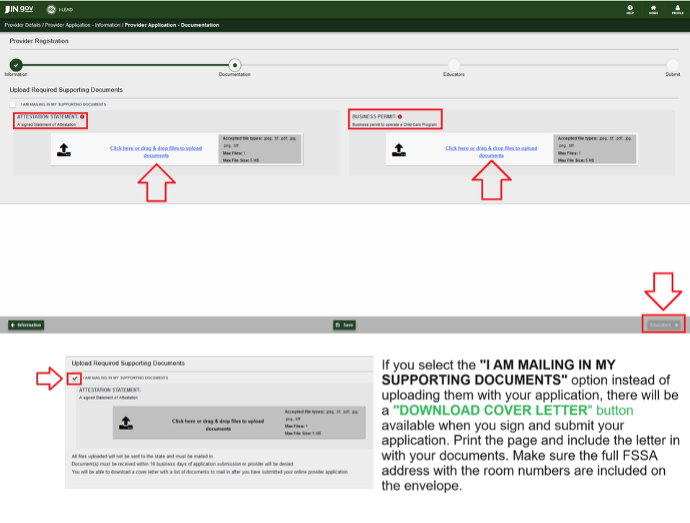
- Upload your documentation or click the box to mail it instead. For a list of commonly required documents and upload tips, see Documentation for Applicants for more information.
Note: If you select the “I am mailing in my supporting documents” option, once you sign and submit your application, use the “Download Cover Letter” option to download and print. Print off the cover letter and include it with copies of your documents. Include the FSSA’s full address with room numbers to ensure the documents reach the right office. Documents must be mailed within 10 calendar days after the application is signed and submitted.
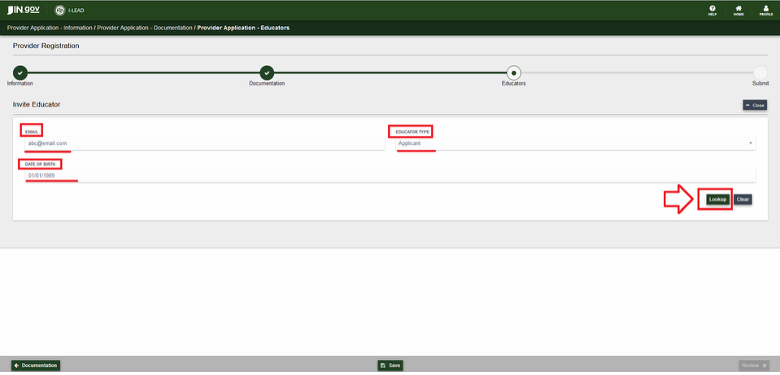
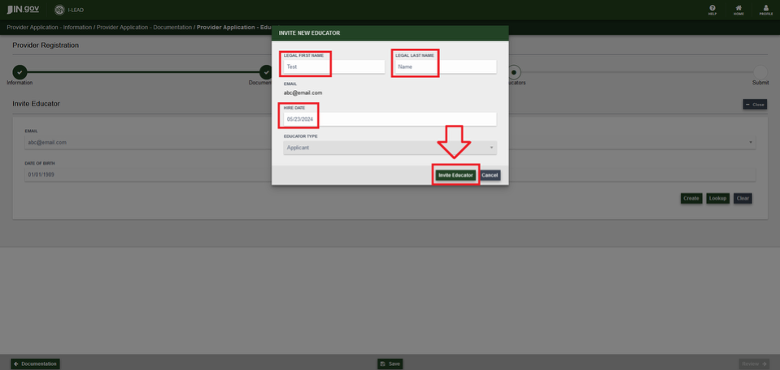
- Educators: This section reflects those who help with the child care facility or licensing applications. Each person needs their own I-LEAD account with an email address that is not shared with anyone else so they can complete their consent forms for background checks. You must enter each person's:
- Email address
- Educator Type
- Date of birth (Format: MM/DD/YYYY)
- Legal First and Last Name (as depicted on government documents)
- Hire Date (Format: MM/DD/YYYY)
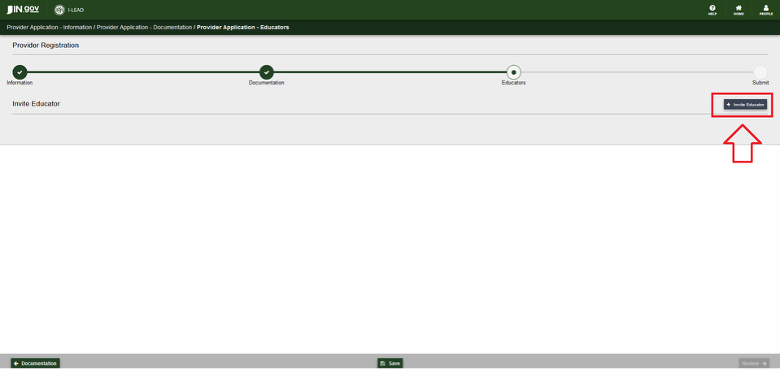
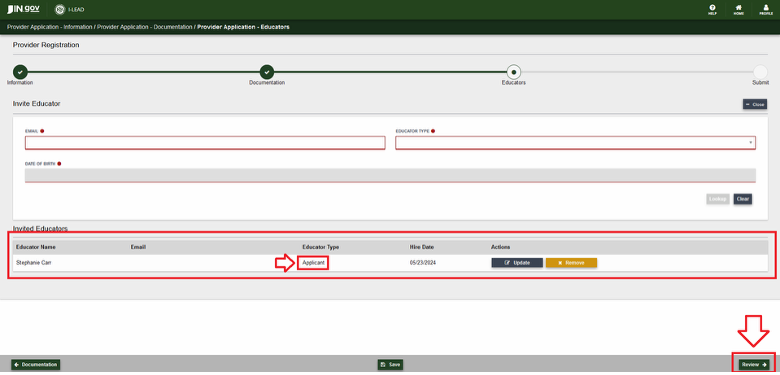
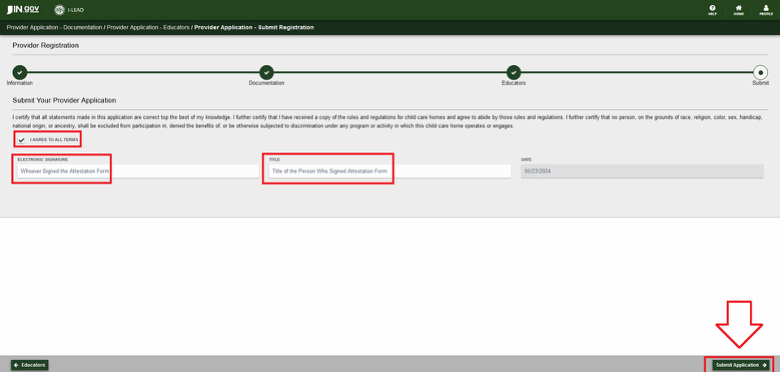
- Submit: This section should be signed and submitted by the applicant who filled out the attestation statement. The attestation statement and signature should be signed by the owner for a home, the director for a center or the pastor/religious leader for a ministry. If you need to add them, click the Educators button to go back and add them as an applicant.
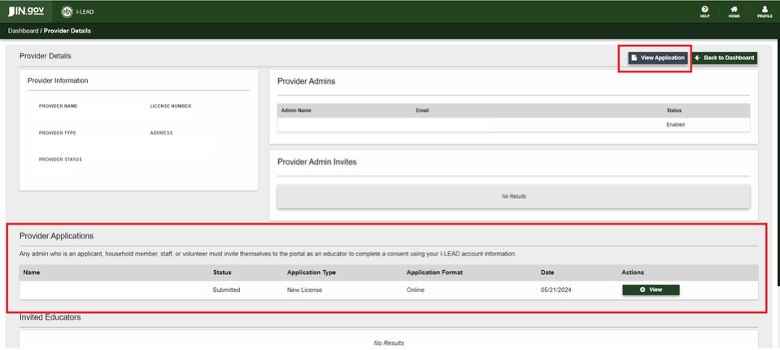
Submission Confirmation: If the application was successfully submitted, the Start Application or Edit Application button will change to a View Application button on the admin page. The status on the Provider Applications section will also change from Draft to Submitted and show the date your application type was sent. A new license number will generate immediately in the Provider section of your I-LEAD dashboard. Click Home and check the Provider section of the I-LEAD dashboard.
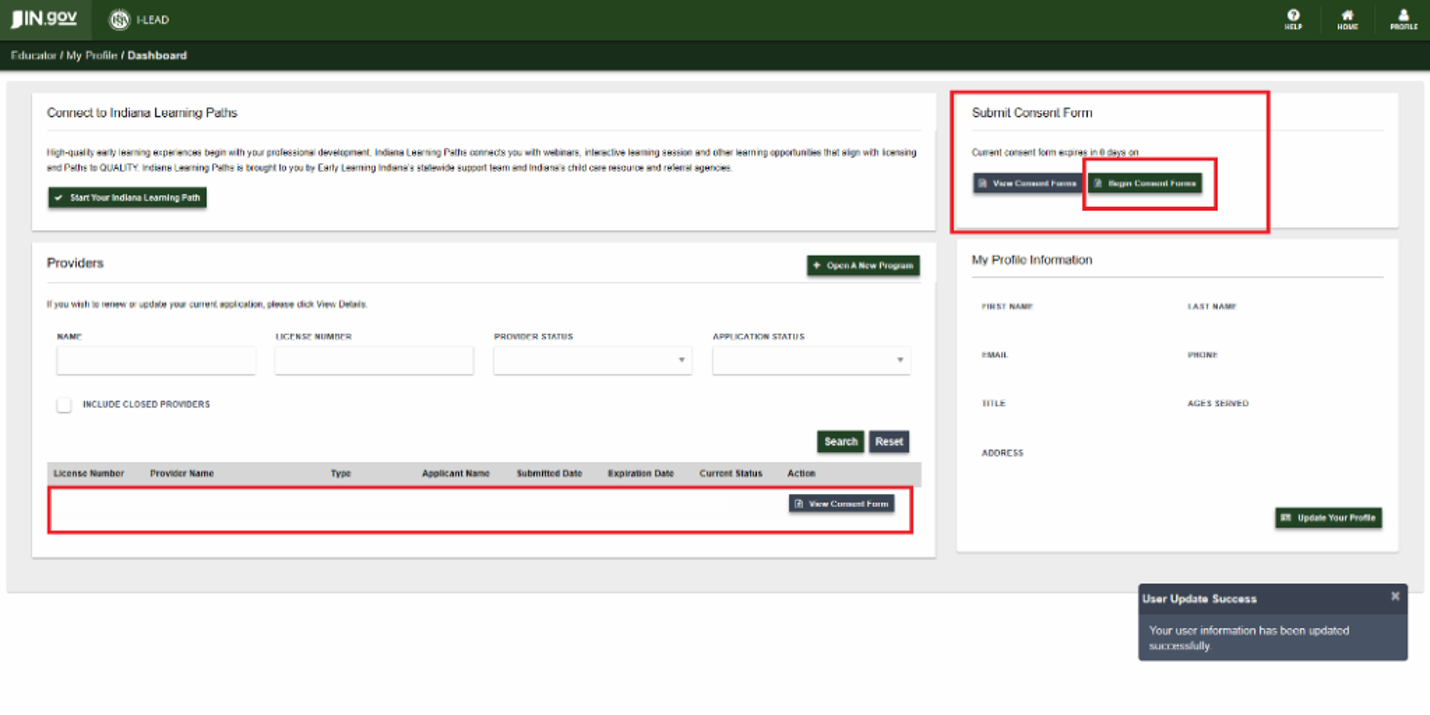
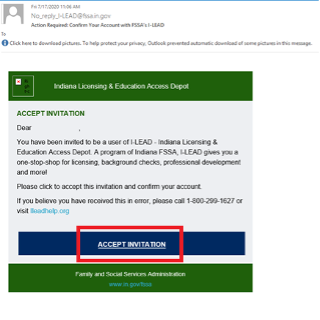
Educator Invitations & Consent Forms Post-Submission: Everyone listed in the Educators section of the application will receive an email from no_reply_i-lead@fssa.in.gov after the application has been signed and submitted. Make sure each person has created an I-LEAD account before they accept the educator invitations sent to their email inboxes . If educator invitations are successfully accepted, each person should have the license listed in the Provider section of their I-LEAD Dashboard and have a consent form to complete and submit with their fingerprints. If an educator is missing an invitation, the person filling out the application should invite them. Once all changes and consent forms for background checks have been completed, the licensing consultant will reach out. New provider admins must accept both an admin invitation to access the license and an educator invitation to access the consent form for a background check.
Consultant Notes
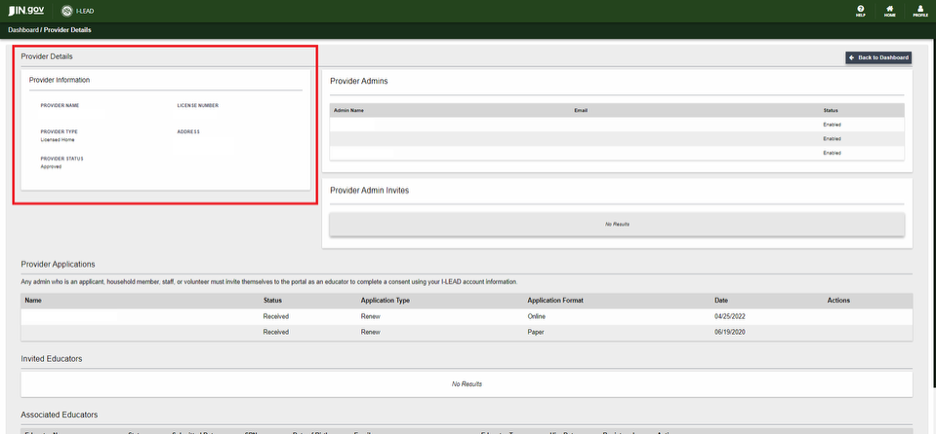
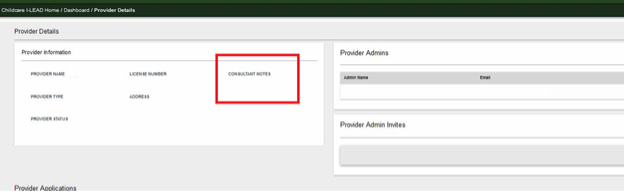
Monitor your email and the View Details or Provider Details section of your license on I-LEAD to see messages from your consultant. If an application requires a change, you may receive an “Incomplete Application” email from no_reply_i-lead@fssa.in.gov, and/or there may be a consultant note in the Provider Information box next to the Provider Admin section. The application may also be in "Edit" mode in the Provider Application section. For an initial inspection and communication, consultants typically communicate by email. The consultant will only schedule an in-person inspection of the premises once all consent forms and licensing paperwork are completed online. Licenses are issued via an admin invitation when all requirements for the child care program are met. Once all changes and consent forms for a background check are complete, the licensing consultant will reach out.
To find your consultant, check out the Consultant Map.