
Completing Training on Indiana Learning Paths


To Access Training on I-LEAD:
- Login to your I-LEAD account.
- Click Start your Indiana Learning Paths.
- Select Training Catalog.
- Click Courses.
- Scroll to Categories or type in the name of your course. Spanish versions of courses are in the Español section.


Locating A Specific Training Module
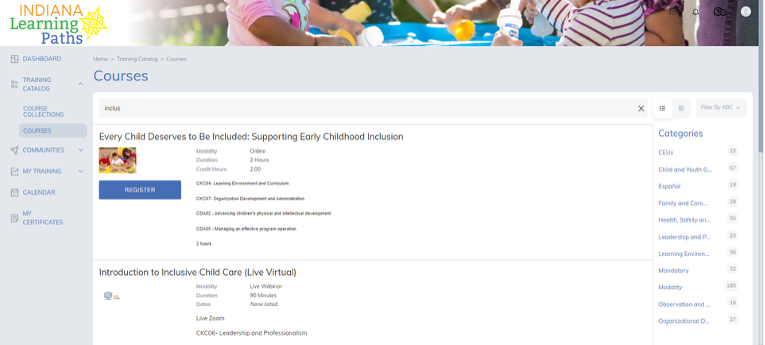
Most courses are in alphabetical order or can be searched by name/keyword in the Search Bar. Less is usually more when attempting to find a course name.
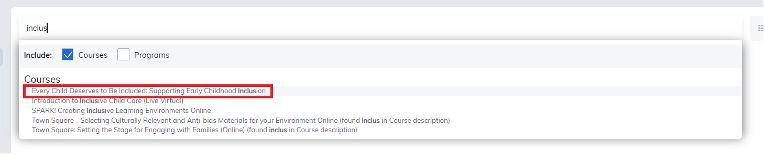
Ex: Typing in part of a word like “inclu” can help locate any courses that focus on “Inclusion,” or typing ‘orient’ and pressing “Enter” can locate the orientation trainings.

Press “Enter” on your keyboard to see all results or click on the name in the drop-down to go to the specific training.
Types of Training:
There are (3) kinds of lessons available online that generate certificates/ credit hours:
Online Coursework
In-Person
Live Webinars
To view the course type and how many credit hours the course is worth, click the Flip for more button.
Licensing Coursework:
| Starting a Child Care Program: |
Provider Admins/ New Licensing Orientation Provider Admins/New Licensing Orientation Training: New provider admins interested in starting a child care program should do the Orientation 1 and 2 trainings (OT 1 and OT 2). The trainings cover the rules and regulations for starting a child care program. Orientation 1 goes over basic rules. Orientation 2 is split into three different lessons depending on the type of program you're interested in establishing. Course Names:
|
Accessing Licensing Application on I-LEAD:
Select the Orientation 2 Training for the type of license you are considering. The requirements manual and checklist are combined under the first document for download in the Resources section of the module. The instructions to complete the license on I-LEAD are also available for download, or click the Open a New Program button on your I-LEAD dashboard to begin the application process.
Legally Licensed Exempt Programs (LLEP) are only required to take Orientation 1: Training for Child Care Providers. However, any program with six (6) or more children enrolled must be licensed and complete the required Orientation 2 Training. Review the requirements checklist to check site compliance before applying. Once the checklist for an LLEP is complete and the location where the child care program will operate meets the requirements for the exemption, click the Open a New Program button on your I-LEAD dashboard to begin the application process.
Start-Up Help:
If you need additional support in the creation of a child care program, contact your Emerging Provider Support (EPS) with OECOSL.
Paths to QUALITYTM Registration: If you are a new provider with a newly approved license and you want to join Paths to QUALITYTM, call the OECOSL Child Care Support Line at 1.800.299.1627.
Staff /Volunteer Onboarding Coursework
Staff Training for Working at a Child Care Program:
New Hires should complete the courses in Educator Onboarding Course Collection Part 1 before they start working at a child care program. To find the required courses, search for the following:
- Indiana Early Learning Standards (Online)
- Note: Formerly known as Introduction to the NEW Indiana Early Learning FOUNDATIONS.
- Note: Required annually; a new Register button will appear in the Certificates section of the course catalog the day after it expires.
- Note: Required annually; a new Register button will appear in the Certificates section of the course catalog the day after it expires.
- ○ Spanish Version Available: Introducción a Paths to QUALITY™ En linea/ Spanish Paths to QUALITY™ Introduction Online.
- Safe Sleep Practices: Module 1 Reducing Sudden Unexpected Infant Death.
- Safe Sleep Practices: Module 2 Implementation in Child Care Settings.
- Note: Required once, but the courses expire after a month in case licensing requires an educator to retake them; a new Register button will appear in the Certificates section of the course catalog the day after they expire.
- Health & Safety Modules:
- Indiana’s Introduction to the Early Childhood and Out-of-School Learning Profession - Online Course - Module 1 - Child Development
- Indiana’s Introduction to the Early Childhood and Out-of-School Learning Profession - Online Course - Module 4 - Child Development (School Age)
- Indiana’s Introduction to the Early Childhood and Out-of-School Learning Profession - Online Course - Module 3 - Safety
- Indiana’s Introduction to the Early Childhood and Out-of-School Learning Profession - Online Course - Module 2 - Health
- Indiana’s Introduction to the Early Childhood and Out-of-School Learning Profession - Online Course - Module 4 - Child Development (School Age)
- Indiana’s Introduction to the Early Childhood and Out-of-School Learning Profession - Online Course - Module 3 - Safety
- Indiana’s Introduction to the Early Childhood and Out-of-School Learning Profession - Online Course - Module 4 - Child Development (School Age)
Notes: Most of these trainings can be found in the Early Learning Substitute Educator Collection Part 1 course collection. The progress for the collection determines which training lessons count toward completed credits. The course will issue certificates and credit unique to that course upon completion of the entire onboarding. Most of these courses must only be taken once in a lifetime and will not trigger a new Register button for those eligible for retake until the entire course collection is completed.
Only those with a Certificate Expiration date in My Certificates are eligible for retake. Please wait until the day after the Certificate Expiration date to retake those courses.
Finding CDA Coursework:
For an updated list of courses based on CDA coursework on Indiana Learning Paths, do the following:
- Log in to ilead.in.gov.
- On the I-LEAD Dashboard, click Start your Indiana Learning Paths.
- Select Training Catalog in your drop-down list. Mobile users might have to click three lines or dots on the left for a menu to show.
- Click Courses.
- At the top of the screen, look for a faded blue Search bar.
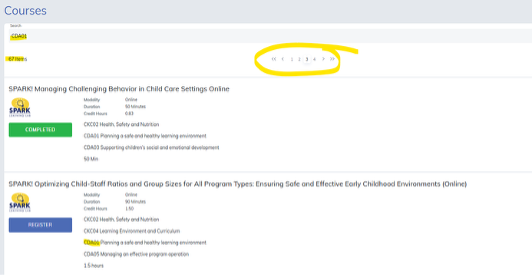
- To find training based on CDA coursework criteria, type in keywords like "CDA01," "CDA02," "CDA03," and so on to find available courses that meet those training requirements. You may have to click through multiple pages to find ones that are available for registration.
- Check the credit hour information, and click Register to add the course to your list of trainings.
Trouble Logging in to Indiana Learning Paths?
If you are unable to automatically connect to Indiana Learning Paths, or if you have issues accessing this segment of the website, try the following steps:
- Go back and re-click Start your Indiana Learning Paths. The website should automatically connect.
- Download and use Google Chrome as your internet browser. For HP, Dell, or Apple Users, use Mozilla Firefox for optimal performance. (Note: If you are doing the universal precautions or child abuse courses, use Google Chrome, but clear cookies and cached images before taking the course.)
- Mobile users: Switch to a computer as some components of the lesson may not work on certain mobile devices.

Note: If you have not created an Access Indiana account yet and merged with your records, this login page will not let you in. Go to access.in.gov to get started.
For more information regarding Indiana Learning Paths, click the links below:
Minimum Passing Assessment Score by Course
Tips to Generate Certificates in Indiana Learning Path
Managing Professional Development Records
Viewing Staff Certificates